
Here is the topology of the environment
| SQL Server | Oracle |
| SQL Server 2019 RTM | Oracle 11g
Platform:Windows 2016 IP:192.168.1.31 Port:1521 |
SQL 2019 RTM does not support versions greater than 12.1, SQL group will release drivers to support current Oracle version in the near future.
Video:https://youtu.be/x2_nxnbVEy8
The extension ‘Data Virtualization’ in ‘Azure Data Studio’ provides an easy to create external tables, please refer https://sqlserver.code.blog/2019/12/06/use-azure-data-studio-to-create-external-table-for-oracle-server/ if you are interested.
Oracle
===
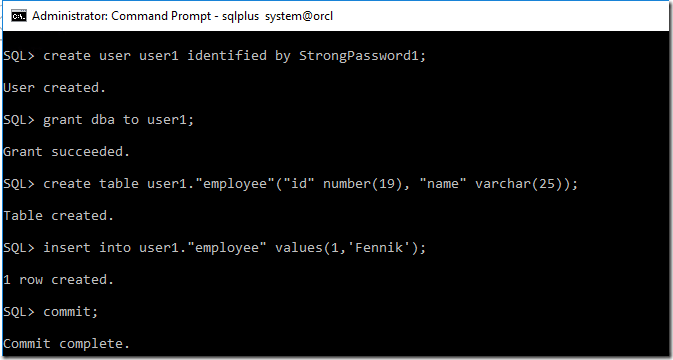
1.Create a user.
create user user1 identified by StrongPassword1;
2.Grant dba permission.
grant dba to user1;
3.Create table and insert data;
create table user1."employee"("id" number(19), "name" varchar(25));
insert into user1."employee" values(1,'Fennik');
commit;
SQL Server
===
1.Install Polybase component. This is an example of SQL Linux in RHEL.Please follow the article to install the component.
sudo yum install -y mssql-server-polybase
2.Restart SQL Server to take effect.
3.Enable polybase feature
exec sp_configure @configname = 'polybase enabled', @configvalue = 1;
reconfigure
4.Create a user database.
create database polyDB2
5.Create a mater key in the user database.
use  polyDB2
go
CREATE MASTER KEY ENCRYPTION BY PASSWORD = 'StrongP@ssword1'
6.create the credential. The identify stands for the User name in Oracle database, and the Secret is the password of the user .
CREATE DATABASE SCOPED CREDENTIAL OracleCredentialTest WITH IDENTITY = 'user1', Secret = 'StrongPassword1';
7.Create an external data source referring the credential in previous step.
CREATE EXTERNAL DATA SOURCE [ORACLE] WITH ( location = 'Oracle://192.168.1.31:1521',CREDENTIAL = OracleCredentialTest)
8.Create the external table
CREATE EXTERNAL TABLE dbo.employee
(
id bigint,
name varchar(25)  COLLATE Latin1_General_100_BIN2_UTF8
)
 WITH (
    location=N'orcl.USER1.employee',---Please note, the 'USER1.employee' is case-sensitive.
    DATA_SOURCE= [ORACLE]
);
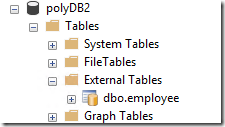
And you can choose which columns are used in the external table in SQL Server. Following query is valid too.
CREATE EXTERNAL TABLE dbo.employee
(
id bigint
)
 WITH (
    location=N'ORCL.USER1.employee',
    DATA_SOURCE= [ORACLE]
);
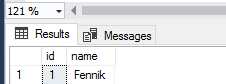
9.The external table is available to use now.
select * from dbo.employee
Errors I experienced
1. Msg 46530, Level 16, State 11, Line 17
External data sources are not supported with type GENERIC.
TSQL:
CREATE EXTERNAL DATA SOURCE [ORACLE] WITH ( location = 'Oracle://192.168.1.31:1521',CREDENTIAL = OracleCredentialTest)
Solution:Make sure Polybase component is installed and ‘polybase enabled’ is set to 1
2. Msg 110045, Level 16, State 1, Line 21
110045;User authorization failed: [Microsoft][ODBC Oracle Wire Protocol driver][Oracle]ORA-01017: invalid username/password; logon denied Additional error <2>: ErrorMsg: [Microsoft][ODBC Oracle Wire Protocol driver][Oracle]ORA-01017: invalid username/password; logon denied, SqlState: 28000, NativeError: 1017
TSQL:
CREATE EXTERNAL TABLE dbo.employee
        (
        id bigint
        )
         WITH (
            location=N'orcl.USER1.employee',
            DATA_SOURCE= [ORACLE]
        );
Cause
===
This error is obvious. Check the ‘CREATE DATABASE SCOPED CREDENTIAL OracleCredentialTest ‘, make sure the user name and password combination is corrected.
3. Msg 2706, Level 16, State 1, Line 21
Table ‘”user1″.”employeE”‘ does not exist.
Please read this article https://docs.oracle.com/cd/B28359_01/server.111/b28286/sql_elements008.htm#SQLRF51109
1)Based on my understanding, it becomes case-sensitive if you create table with quotation mark.
Please make sure the schema name and table name in the ‘location’ exactly matches the one you used in Oracle
For example, you create a table in Oracle like this:
create table user1."employee"("id" number(19), "name" varchar(25));
Running following TSQL will cause the error.
CREATE EXTERNAL TABLE dbo.employee
   (
   id bigint
   )
    WITH (
       location=N'ORCl.USER1.employeE',---The last E is upper case, which causes error.
       DATA_SOURCE= [ORACLE]
   );
2)If the table is created without quotation marks, Oracle will use an all-uppcase search for the name.
If you have a table like following:
create table user1.employee("id" number(19), "name" varchar(25));
The word ’employee’ in the ‘location’ must be upper case, else it raises error 2706
CREATE EXTERNAL TABLE dbo.employee
 (
 id bigint
 )
  WITH (
     location=N'ORCl.USER1.EMPLOYEE',---if any character of 'EMPLOYEE' is lower case, 2706 happens.
     DATA_SOURCE= [ORACLE]
 );
Please note, this rule also applies the schema name.
4.1 Msg 105083, Level 16, State 1, Line 3
105083;The following columns in the user defined schema are incompatible with the external table schema for table ’employee’: user defined column: ‘iD‘ was not found in the external table. The detected external table schema is: ([id] DECIMAL(19), [name] VARCHAR(25) COLLATE Latin1_General_100_BIN2_UTF8).
This is similar to the error 2706.
If the column is created with quotation mark, the name of column in the ‘External table’ in SQL Server needs to exactly match the one you used in Oracle.
If the column is created without quotation mark, the name of column in the ‘External table’ in SQL Server needs to be upper case.
4.2 Msg 105083, Level 16, State 1, Line 3
105083;The following columns in the user defined schema are incompatible with the external table schema for table ’employee’: user defined column: ([name] VARCHAR(25)) is not compatible with the type of detected external table column: ([name] VARCHAR(25) COLLATE Latin1_General_100_BIN2_UTF8). The detected external table schema is: ([id] DECIMAL(19), [name] VARCHAR(25) COLLATE Latin1_General_100_BIN2_UTF8).
In case the default collation in sql server database is not the collation in Oracle, you need to specify the collation explicitly used in Oracle.
CREATE EXTERNAL TABLE dbo.employee
(
id bigint,
name varchar(25) COLLATE Latin1_General_100_BIN2_UTF8
)
WITH (
location=N'ORCL.USER1.employee',
DATA_SOURCE= [ORACLE]
);
 SQL Server
3 thoughts on “An example of Polybase for Oracle(TSQL)”